Welcome to the nixB Codelab! In this interactive lab, we will explore the foundational problems of software reproducibility. We won't start by learning a tool; instead, we will start by experiencing the reason tools like Nix were built in the first place.
What you'll learn
- The difference between application-level dependency management and system-level reproducibility.
- Why modern infrastructure suffers from configuration drift ("The Jenga Tower").
- How Nix solves these problems using pure functions ("The Blueprint").
- How to write your first
flake.nixto guarantee a reproducible environment.
Prerequisites & Setup
To run this laboratory, you need the Nix package manager with Flakes enabled.
Unlike traditional package managers, Nix will not alter your global system files (/usr/bin, /etc). Everything Nix downloads or builds is stored safely inside a dedicated /nix directory, which can be cleanly removed at any time.
1. Quick Install (Recommended: Linux, macOS, WSL2)
The fastest, most reliable way to install Nix with experimental features (Flakes & new CLI) automatically enabled is via the Determinate Systems installer:
curl --proto '=https' --tlsv1.2 -sSf -L https://install.determinate.systems/nix | sh -s -- install
Follow the on-screen prompts and restart your terminal session once the script finishes.
2. Upstream Install Alternative
If you prefer the standard upstream installer from nixos.org:
# Run multi-user daemon installer
sh <(curl -L https://nixos.org/nix/install) --daemon
Important: If using the upstream installer, you must explicitly enable Flakes by creating ~/.config/nix/nix.conf:
mkdir -p ~/.config/nix
echo "experimental-features = nix-command flakes" >> ~/.config/nix/nix.conf
3. Verify Your Installation
Verify that your terminal recognizes Nix and that Flakes are operational:
nix --version
(You should see
nix (Nix) 2.x.x
or later).
Peace of Mind: Should you ever wish to completely remove Nix after completing this course, simply run /nix/nix-installer uninstall (if using the quick installer) or delete /nix and your Nix configuration files.
Let's dive in!
The Hook: Let's experience a classic failure. Imagine you're working on a Python project that requires a specific C library (libsecp256k1) to compile securely.
If you have Nix installed, we can simulate this environment failure without polluting your host system or needing to pre-install Python/pip:
Run this command in your terminal:
nix shell nixpkgs#uv --command uv run --no-binary --with secp256k1 python -c "import secp256k1"
Nix will dynamically fetch the uv toolchain, which automatically sets up a clean, isolated Python environment. The --no-binary flag forces uv to compile secp256k1 from source instead of downloading pre-compiled binaries. You will immediately encounter a build failure:
× Failed to build `secp256k1`
├─▶ The build backend returned an error
...
'pkg-config' is required to install this package (or 'secp256k1.h' file not found)
Why did this happen? Nix successfully provided a clean Python interpreter and uv dynamically, but because we did not declare the C library dependencies (pkg-config, secp256k1 development headers) in our environment shell, uv has no access to the system-level components needed to compile the C-extension. This illustrates that language-level package managers cannot resolve system-level dependencies.
Application-level package managers (like pip, uv, poetry, npm, or cargo) only manage files within their own localized runtime sandboxes. They make a massive, unstated assumption: that the underlying host operating system already provides the required C compilers, dynamic linkers, and system headers.
The "Jenga Tower" Mental Model
When setting up environments traditionally, developers rely on imperative commands:
sudo apt-get update && sudo apt-get install -y build-essential libsecp256k1-dev pkg-config
Every time a command with sudo is executed, it mutates the global state of the operating system:
- Shared libraries are written directly into
/usr/libor/usr/local/lib. - Header files overwrite
/usr/include. - Global symlinks shift unpredictably.
Over months of development, your operating system turns into a "Jenga Tower". Each project pulls or modifies system dependencies until a single package update causes the entire environment to collapse. Worse still, you cannot capture this state in your project's Git repository.
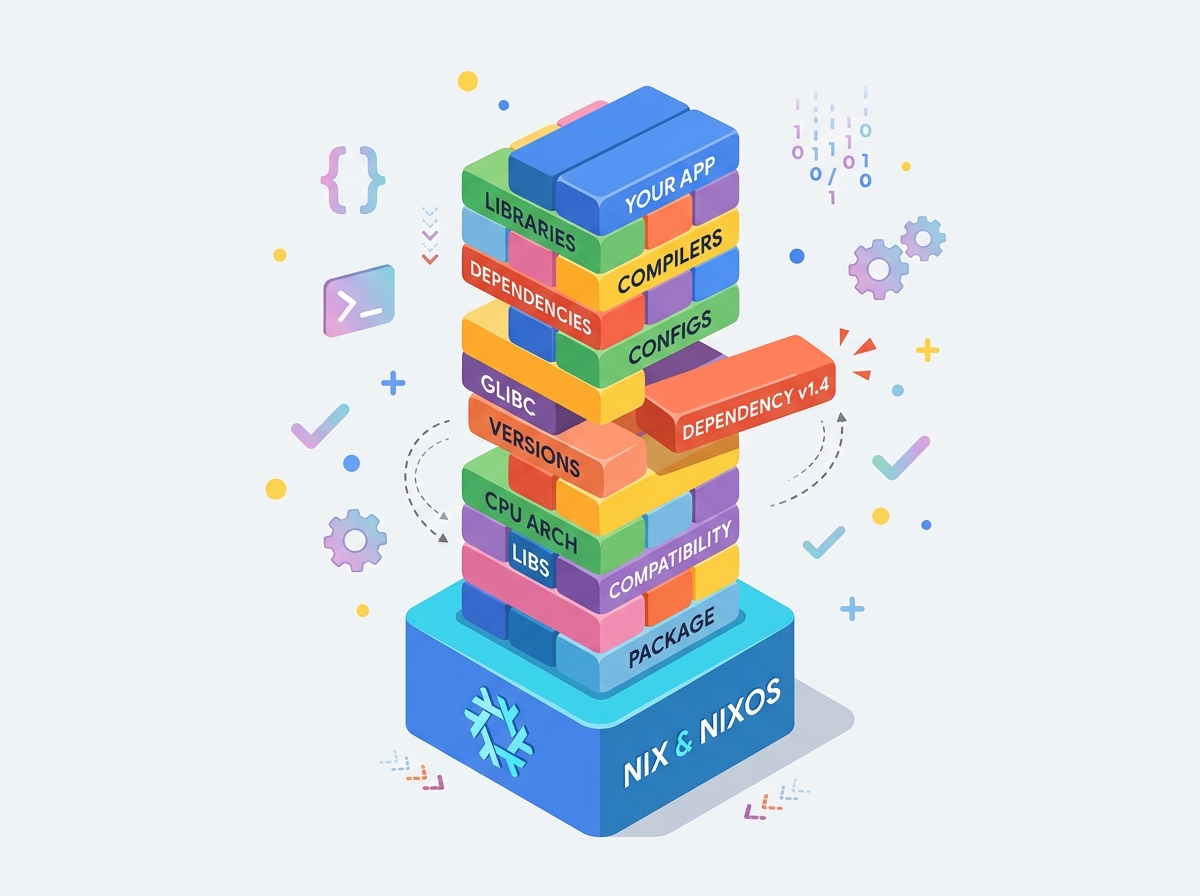
Figure 1: The Jenga Tower mental model illustrating how progressive imperative system modifications destabilize development environments.
Key Takeaway: Application package managers don't manage machines; they only manage files inside their language boundary. When C extensions are involved, global OS mutation creates configuration drift.
The difference between "the code compiles on my laptop" and "the system deploys deterministically on any machine" is what we call the Reproducibility Gap.
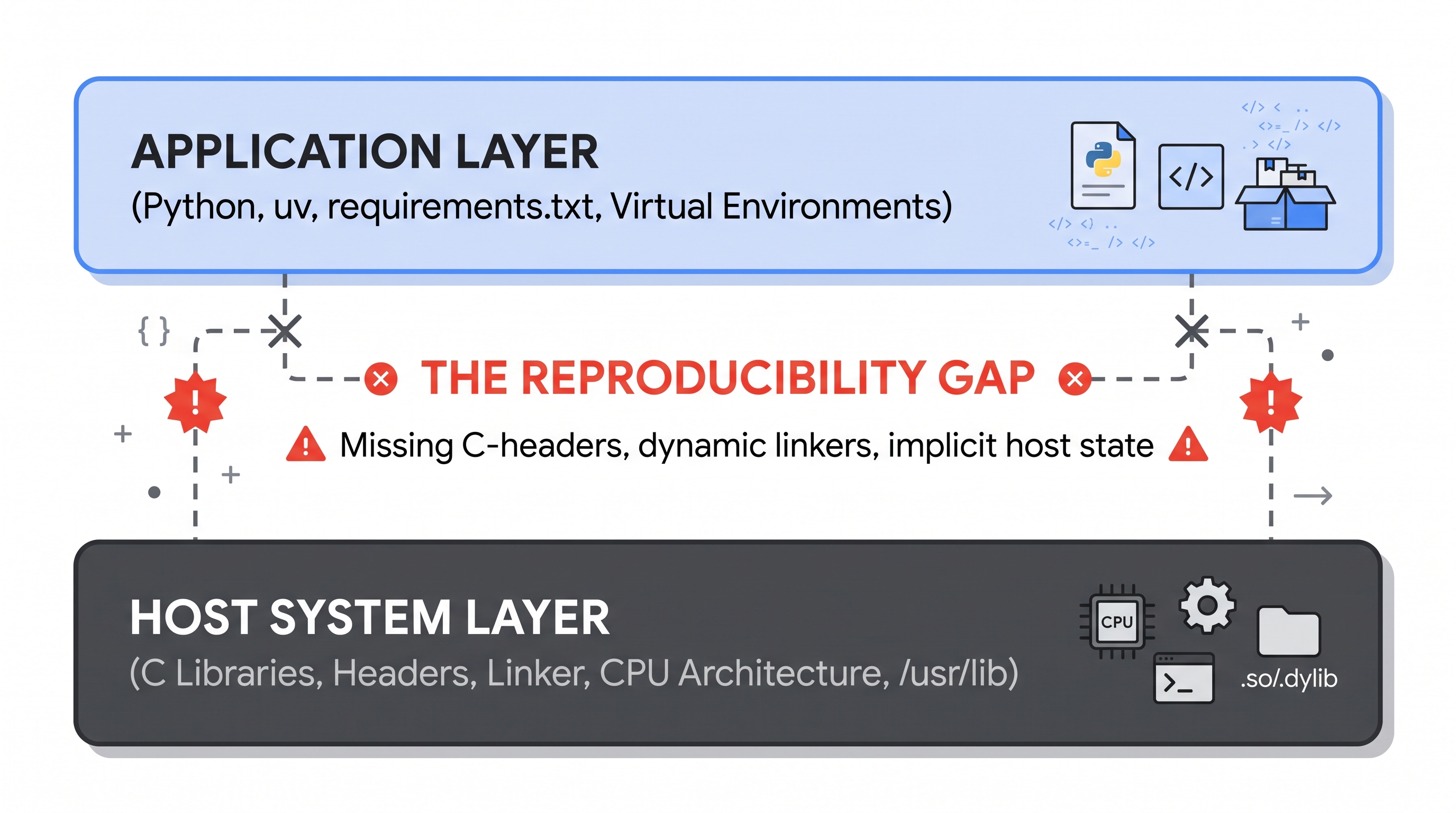
Figure 2: The Reproducibility Gap between language-level package managers and host system dependencies.
The table below contrasts the main paradigms used in industry today:
Technology | Scope of Isolation | Mechanism | The Reproducibility Weakness |
Virtualenv / uv | Language runtime | Path redirection | Zero system isolation; fails when native C/C++ libraries are missing. |
Docker | User-space filesystem | Linux cgroups / namespaces | Imperative Dockerfiles ( |
Nix Flakes | Complete dependency graph | Cryptographic hash in | Absolute determinism via mathematical pure functions and locked dependency trees. |
Nix is not just a package manager; it is a purely functional deployment model.
In purely functional programming, a pure function f(x) guarantees:
- Given the identical input
x, it always returns the exact same outputy. - It produces zero side effects (it does not modify global state).
Nix applies this mathematical principle to system software:
- Derivations as Pure Functions: Every package build is evaluated in an isolated sandbox with zero network access and no access to
/usr/libor/bin. - The Cryptographic Store: Build outputs are stored in read-only paths under
/nix/store/. The- - / - Coexistence Without Conflict: Multiple incompatible versions of the same library (e.g.,
libsecp256k1-v0.1andlibsecp256k1-v0.4) can peacefully coexist on the same disk without collision.
In 2019, Nix introduced Flakes, bringing modern declarative lockfile semantics to system environments. A Flake standardizes two files:
flake.nix(The Blueprint): An explicit, declarative description of your project's inputs (source repositories, package sets) and outputs (packages, development shells, services).flake.lock(The Pin): A cryptographically pinned JSON manifest recording the exact Git commit hashes of every dependency.
When a collaborator clones your repository and runs nix develop, Nix reads flake.lock and reconstructs the bit-for-bit identical environment—whether running on Ubuntu, Arch Linux, macOS, or a Chromebook thin client.
Let us now resolve the compilation failure we witnessed in Step 2. Instead of polluting our operating system with sudo apt install libsecp256k1-dev, we declare our environment declaratively.
Writing the Hermetic Shell
We create a flake.nix that injects secp256k1 and pkg-config directly into our local development shell:
{
  description = "Hermetic Python C-Extension Laboratory";

  inputs = {
    nixpkgs.url = "github:NixOS/nixpkgs/nixos-unstable";
  };

  outputs = { self, nixpkgs }:
    let
      system = "aarch64-linux"; # or "x86_64-linux" / "aarch64-darwin"
      pkgs = import nixpkgs { inherit system; };
    in {
      devShells.''${system}.default = pkgs.mkShell {
        # System-level dependencies made available to the compiler
        nativeBuildInputs = [ pkgs.pkg-config ];
        buildInputs = [ pkgs.secp256k1 ];

        # Language runtime
        packages = [ pkgs.uv (pkgs.python311.withPackages (ps: [])) ];

        shellHook = ''
          echo "🛡️ Hermetic C-Extension Shell Initialized"
        '';
      };
    };
}
Verifying the Fix
Now run the exact same command wrapped in our Nix environment:
nix develop --command uv run --no-binary --with secp256k1 python -c "import secp256k1; print('✅ Successfully imported secp256k1!')"
Output:
🛡️ Hermetic C-Extension Shell Initialized
✅ Successfully imported secp256k1!
Nix dynamically linked the C-header files and compiled the Python extension within a transient, hermetic environment—leaving the host machine completely untouched.
Traditional Infrastructure as Code (IaC) tools like Ansible, Chef, or Puppet are imperative state machines: they execute scripts against an existing machine, attempting to push it toward a desired state. If a package was manually installed or removed previously, Ansible playbooks can fail unpredictably.
Nix represents True Declarative IaC:
- You do not write steps to transition state ("install this, then delete that").
- You declare the complete, finished state of the entire universe as a graph.
- The system derivation builds atomically: either the entire graph succeeds and symlinks switch instantaneously, or nothing changes.
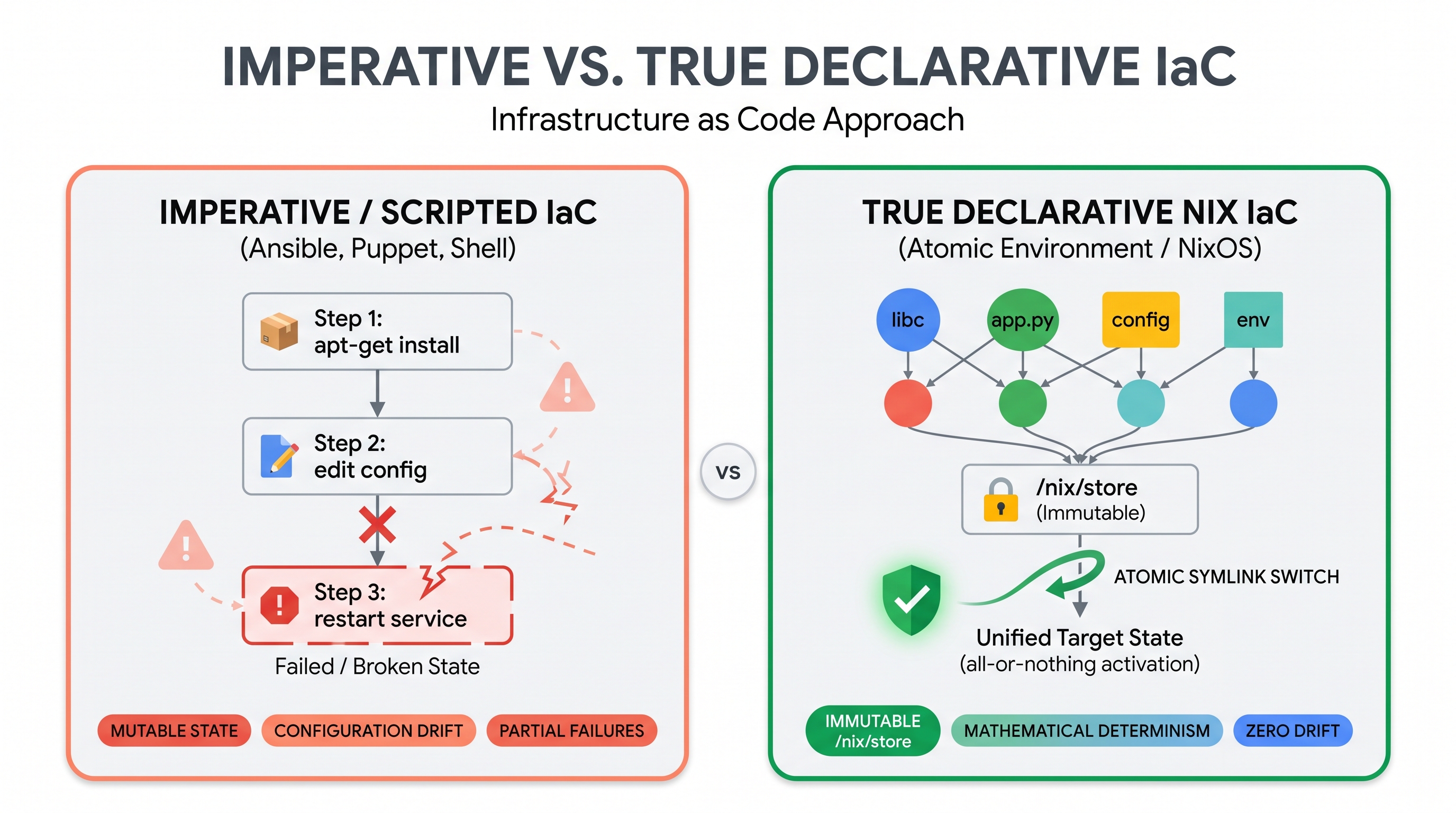
Figure 3: Imperative state modification vs pure atomic graph evaluation in Infrastructure as Code.
Before progressing to the advanced multi-daemon laboratory, test your understanding of the core concepts covered so far. Select your answers and click Check Answer for immediate validation:
Why did uv run --no-binary --with secp256k1 fail on our initial host run in Step 2?
How does Nix prevent dependency collisions between two different versions of the same library?
What fundamental reproducibility advantage distinguishes Nix Flakes from traditional Dockerfiles?
Now that the conceptual foundations are verified, we transition into the advanced hands-on laboratory. Here, we demonstrate how Nix orchestrates a heterogeneous, high-stakes financial software stack: a private Bitcoin Regtest node, a Core Lightning (CLN) daemon, and LNbits with its native Scrum task extension.
1. Cloning the Laboratory Repository
The full multi-daemon orchestrator and extension laboratory are packaged in the nixB repository. Open your terminal, clone the repository, and enter the root workspace:
git clone https://github.com/andre-amorim/ou_tm470.git
cd ou_tm470
Repository Anatomy: The laboratory definitions and LNbits extensions are encapsulated within the lab/ directory, while the root flake.nix unifies the entire multi-daemon lifecycle and data sandbox.
2. Launching the Multi-Daemon Environment
From the root of the cloned repository, execute the unified bootstrap command:
nix run .#bootstrap
Notice what Nix is doing:
- It compiles or fetches
bitcoind,lightningd,caddy, anduvwithout requiring root permissions. - It initializes a clean, ephemeral sandbox in
.data/.
3. Inspecting the Isolated Bitcoin Node
Open a second terminal, navigate to the ou_tm470 repository directory, and query your local regression testing daemon:
bitcoin-cli -datadir=.data/bitcoin getblockchaininfo
Notice that the chain is reported as regtest. To simulate immediate transaction confirmation, mine 101 initial blocks:
bitcoin-cli -datadir=.data/bitcoin generatetoaddress 101 $(bitcoin-cli -datadir=.data/bitcoin getnewaddress)
4. Interacting with LNbits and the Scrum Extension
Open your web browser and navigate to:
http://localhost:5000
- Log in with the pre-configured administrator credentials:
- Username:
admin - Password:
TM470NixB
- Username:
- Create or open your default wallet.
- Access the pre-activated Scrum board extension directly at:
http://localhost:5000/scrum/ - Notice how task completion is programmatically tied to instant, off-chain Lightning satoshi settlements.
Tip: If port 5000 or 8080 is already occupied on your system, you can supply custom ports via environment variables: PORT=5050 nix run .#bootstrap.
Why is software reproducibility critical for mission-critical and financial software?
- Supply Chain Defense: If developers cannot deterministically rebuild a binary from source code, malicious backdoors (such as the famous XZ Utils backdoor CVE-2024-3094) can be secretly injected during distribution without detection.
- Auditability & Attestation: Independent reviewers across the world can compile the exact same Git commit and verify that their SHA-256 output hashes match bit-for-bit.
- Eliminating "Works On My Machine": Eliminates subtle bugs caused by differing glibc versions, compiler optimization flags, or unpinned transitive libraries.
As you conclude this laboratory, reflect on the software engineering implications:
- Trade-offs: Nix provides mathematically rigorous reproducibility, but what are its costs? Consider the initial learning curve, disk storage overhead of
/nix/store, and adapting non-standard build systems. - Solo vs. Team Development: How does declarative infrastructure streamline onboarding for open-source contributors and distributed teams?
- Action Item: Capture your reflections, screenshots of your passing build, and your Bitcoin Regtest block height in your project learning journal.
Congratulations! You have completed the nixB Didactic Laboratory for Software Reproducibility.
What you've accomplished:
- Diagnosed the root causes of configuration drift and the Reproducibility Gap.
- Contrasted imperative FHS mutations with declarative pure functions.
- Authored a hermetic
flake.nixdevelopment shell for native C-extensions. - Orchestrated a local multi-daemon Bitcoin Regtest & LNbits environment.
To explore further, check out the project monorepo at GitHub: andre-amorim/ou_tm470.